

Leadership insight
Looking beyond Excel to manage capital programs
Spreadsheets like Excel limit visibility, collaboration, and scalability in capital program management. Moving to integrated, cloud-based platforms enables real-time insights, better governance, and more informed decision-making across complex, multi-stakeholder infrastructure programs.


I recently had the opportunity to speak at a professional engineering event about the benefits of using Program Management Information Systems (PMIS) instead of traditional spreadsheets. After my presentation, a skeptical county engineer approached me, seeking more details about PMIS. This conversation made me reflect on why so many professionals rely on Excel, even as complexities increase and data becomes more difficult to manage. The reality is concerning because while many know the limitations of spreadsheets, they do not fully understand how PMIS can streamline their work.

I estimate that over 3,000 counties and 16,000 cities across the U.S. rely on Excel to manage their Capital Improvement Plan (CIP) processes. These counties are critical to America’s infrastructure, maintaining 46% of the nation’s roads and 40% of the bridges, making them the largest stakeholders in local road and bridge projects.
The need for efficient interaction with citizens has grown significantly in recent years. Opportunities provided by the $1.2 trillion IIJA (Infrastructure Investment and Jobs Act) and other programs, such as Safe Streets and Roads for All (SS4A), focusing on Intelligent Transportation Systems (ITS), underscore the importance of effective management and reporting systems. Using Excel can pose project-tracking and communication challenges, limiting its ability to respond to citizen information requests and to organize critical documentation.
Moreover, the evolving workforce, influenced by Generation X, Millennials, and Generation Z, increasingly demands digitized and automated processes. These generations are more likely to question the lack of automation than resist it, disliking repetitive tasks that add little value.
Excel as a PMIS
Excel is commonly used as a PMIS. However, it does not provide complete oversight and coordination across your entire capital program life cycle. This leads to inefficiency, and the construction industry is notoriously unproductive, as the Chicago Booth Review study shows.
Typically, a few staff members are charged with maintaining several spreadsheets. However, there are obvious drawbacks to using Excel:
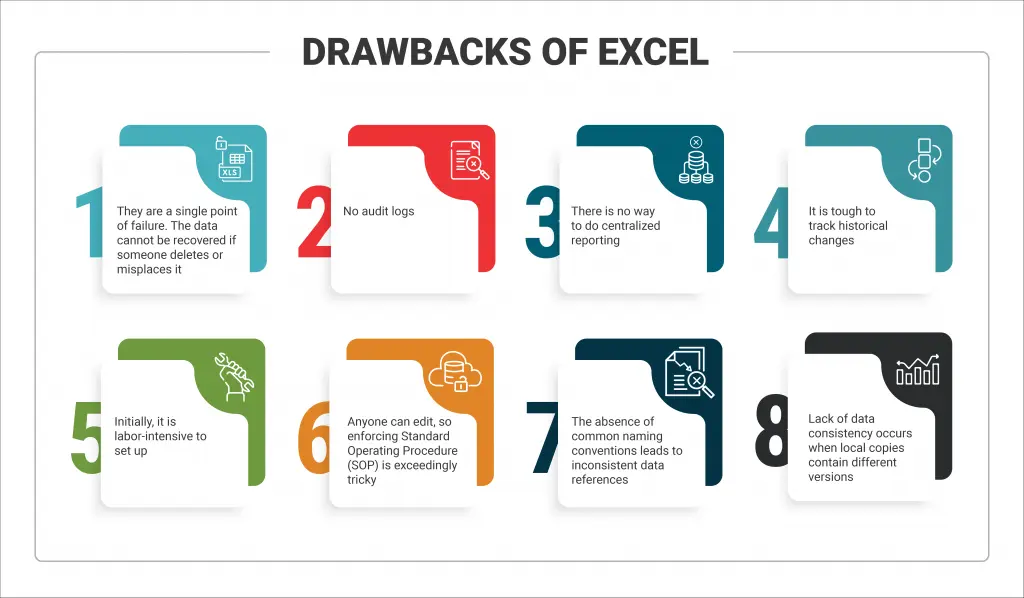
If the agency manages to address the issues mentioned, the finance system must still reconcile the data. These systems are restrictive environments, generally used to handle higher-level details, but often lack all necessary information. This gap leads to independent, error-prone workflows for project initiation, design, estimation, bidding, bid evaluation, contract drafting, bonding, insurance requirements, and more.
Why use a PMIS solution?
Final thoughts
About the author
Tim Pratt brings over 40 years of experience helping local government agencies adopt and implement technology solutions for infrastructure planning, project management, asset maintenance, construction design, and GIS.
He is a passionate advocate for efficient workflows through documentation, minimalization, and automation. At Aurigo, he serves as the Industry Leader for Local Government, advising agencies on modernizing infrastructure programs and advancing digital transformation across capital planning and delivery.
Before joining Aurigo, Tim held technology leadership roles with the City of Lincoln, Nebraska, where he worked closely with public infrastructure teams on major transportation and utilities initiatives. In addition to leading technology programs, he has served as a designer, project manager, and administrator for numerous public infrastructure projects. He holds a bachelor’s degree in Public Administration from Doane University.
You might like


Process improvement and cultural change: How to drive technology decisions that matter for your public agency
Learn more
About the author
Tim Pratt brings over 40 years of experience helping local government agencies adopt and implement technology solutions for infrastructure planning, project management, asset maintenance, construction design, and GIS.
He is a passionate advocate for efficient workflows through documentation, minimalization, and automation. At Aurigo, he serves as the Industry Leader for Local Government, advising agencies on modernizing infrastructure programs and advancing digital transformation across capital planning and delivery.
Before joining Aurigo, Tim held technology leadership roles with the City of Lincoln, Nebraska, where he worked closely with public infrastructure teams on major transportation and utilities initiatives. In addition to leading technology programs, he has served as a designer, project manager, and administrator for numerous public infrastructure projects. He holds a bachelor’s degree in Public Administration from Doane University.